
Lesson 7 of 16 in Python for Biologists, a free beginner course with ecology examples.
Every field day starts with decisions. If it is raining, the bat survey is postponed. If the water is above 10 °C, the newts are probably active. If a nest has eggs, you record the clutch size, otherwise you move on. Until now, our programs ran every line from top to bottom no matter what. In this lesson they learn to choose.
Quick answer: An if statement runs a block of code only when a condition is True. Add else to say what happens when it is False, and elif (short for “else if”) to check more conditions in order. Python runs only the first block whose condition is true. The line with the condition ends with a colon, and the code that belongs to it is indented by 4 spaces.
What You Will Learn in This Lesson
- How to write an
ifstatement and why indentation matters - How
elsegives your program a second path - How
elifhandles three or more outcomes, and why order matters - When to use several separate
ifstatements instead - How nested
ifstatements work, and whenandis simpler
What Is an if Statement in Python?
An if statement asks a yes or no question. If the answer is True, Python runs the indented code below it. If the answer is False, Python skips that code and carries on with the rest of the program.
water_temp_c = 12

if water_temp_c > 10:
    print("Warm enough for the newt survey.")

print("Data sheet ready.")
Warm enough for the newt survey.
Data sheet ready.Change water_temp_c to 8 and run it again. Only Data sheet ready. appears, because the condition is false and the indented line is skipped. The last line is not indented, so it always runs.
The condition can be anything that gives True or False: the comparison operators and the logical operators and, or and not from lesson 5.
What Is the Python if Syntax?
if condition:
code that runs when the condition is True- The line starts with
if, followed by the condition. - It ends with a colon
:. Forgetting it is one of the most common beginner errors. - The code that belongs to the
ifis indented by 4 spaces. VS Code does this for you when you press Enter after the colon.
Why Does Indentation Matter in Python?
Many languages use curly brackets to mark which lines belong together. Python uses indentation instead. That means indentation is not just style: it changes what the program does. If you forget it, Python refuses to run:
water_temp_c = 12
if water_temp_c > 10:
print("Warm enough for the newt survey.")
IndentationError: expected an indented block after 'if' statement on line 2All lines with the same indentation form one block. You can put as many lines in a block as you need. The block ends at the first line that goes back to the left.
How Does if else Work in Python?
With only if, the program does nothing when the condition is false. else adds a second path, so the program always does one of two things.
weather = "rain"

if weather == "rain":
    print("Bat survey postponed.")
else:
    print("Bat survey goes ahead tonight.")
Bat survey postponed.Three rules for else:
elsehas no condition. It simply catches everything theifdid not.- It ends with a colon and its block is indented, just like
if. - It can never stand alone. An
elsewithout anifabove it gives aSyntaxError. Anifwithout anelseis perfectly fine.
Here is the pattern with user input from lesson 6. Is a species present at a site?
count = int(input("How many individuals did you record? "))

if count > 0:
    print("Species present.")
else:
    print("Species not recorded.")
How Does elif Work in Python?
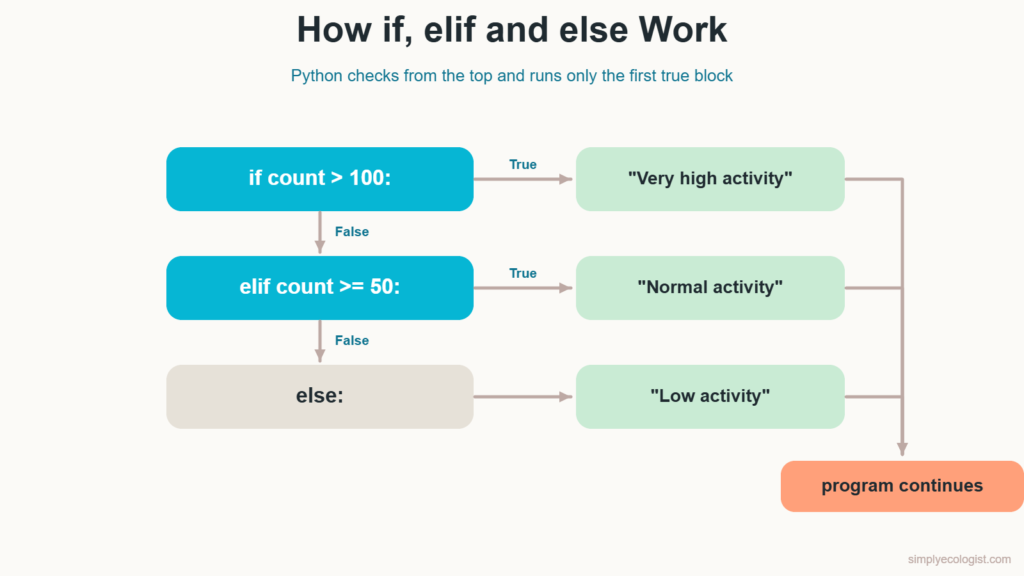
Field data rarely has only two outcomes. elif lets you check a second, third or tenth condition. You can add as many elif blocks as you need, and finish with an optional else for everything left over.
count = int(input("Birds counted at the feeder: "))

if count > 100:
    print("Very high activity.")
elif count >= 50:
    print("Normal activity.")
else:
    print("Low activity. Check the feeder.")
Birds counted at the feeder: 72
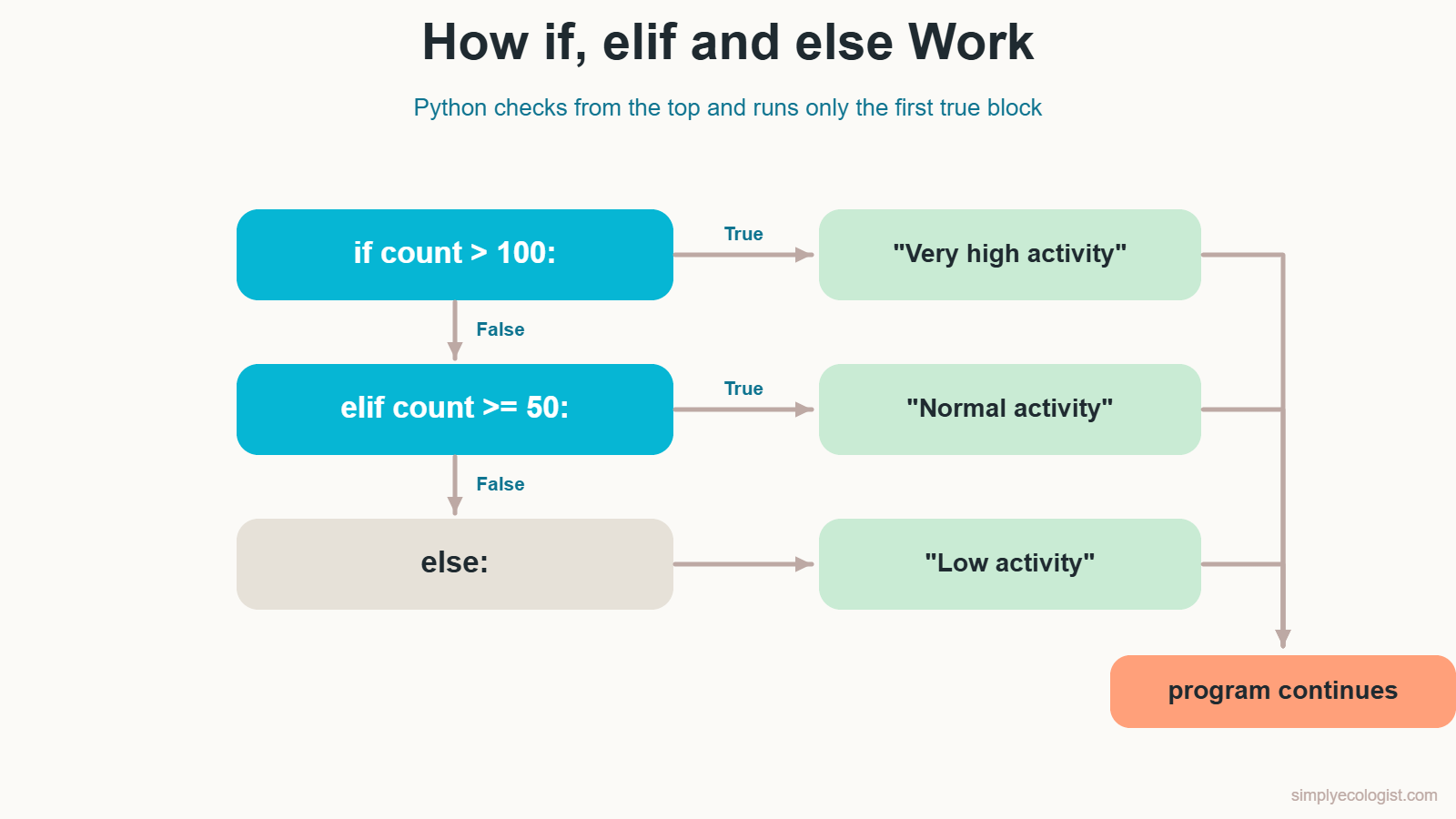
Normal activity.Python checks the conditions from top to bottom and runs only the first block whose condition is true. Then it skips the rest of the chain and continues with the code after it. That is why the second condition only needs count >= 50: if Python gets that far, it already knows the count is not above 100.
Why Does the Order of Conditions Matter?
Because only the first true condition runs, a wide condition placed first can hide the ones below it:
count = 150

if count >= 50:
    print("Normal activity.")
elif count > 100:
    print("Very high activity.")
Normal activity.150 is very high, but count >= 50 is also true and comes first, so the second block never gets a chance. Put the most specific or most extreme condition first.
Watch the Edges of Your Ranges
Boundaries are where most bugs hide. What happens to a count of exactly 100 here?
count = 100

if count > 100:
    print("Very high activity.")
elif 50 <= count < 100:
    print("Normal activity.")
else:
    print("Low activity. Check the feeder.")
Low activity. Check the feeder.100 is not above 100, and it is not below 100 either, so it falls through to else and gets the wrong label. Always test your program with the exact boundary values, here 49, 50, 100 and 101.
When Should I Use Separate if Statements Instead of elif?
Use elif when the outcomes exclude each other: a count is high or normal or low, never two at once. Use separate if statements when several can be true at the same time and you want all of them.
plot = 12

if plot % 2 == 0:
    print("Plot is divisible by 2")
if plot % 3 == 0:
    print("Plot is divisible by 3")
if plot % 4 == 0:
    print("Plot is divisible by 4")
Plot is divisible by 2
Plot is divisible by 3
Plot is divisible by 4With elif instead, only the first line would print, because Python would stop after the first true condition.
What Is a Nested if Statement in Python?
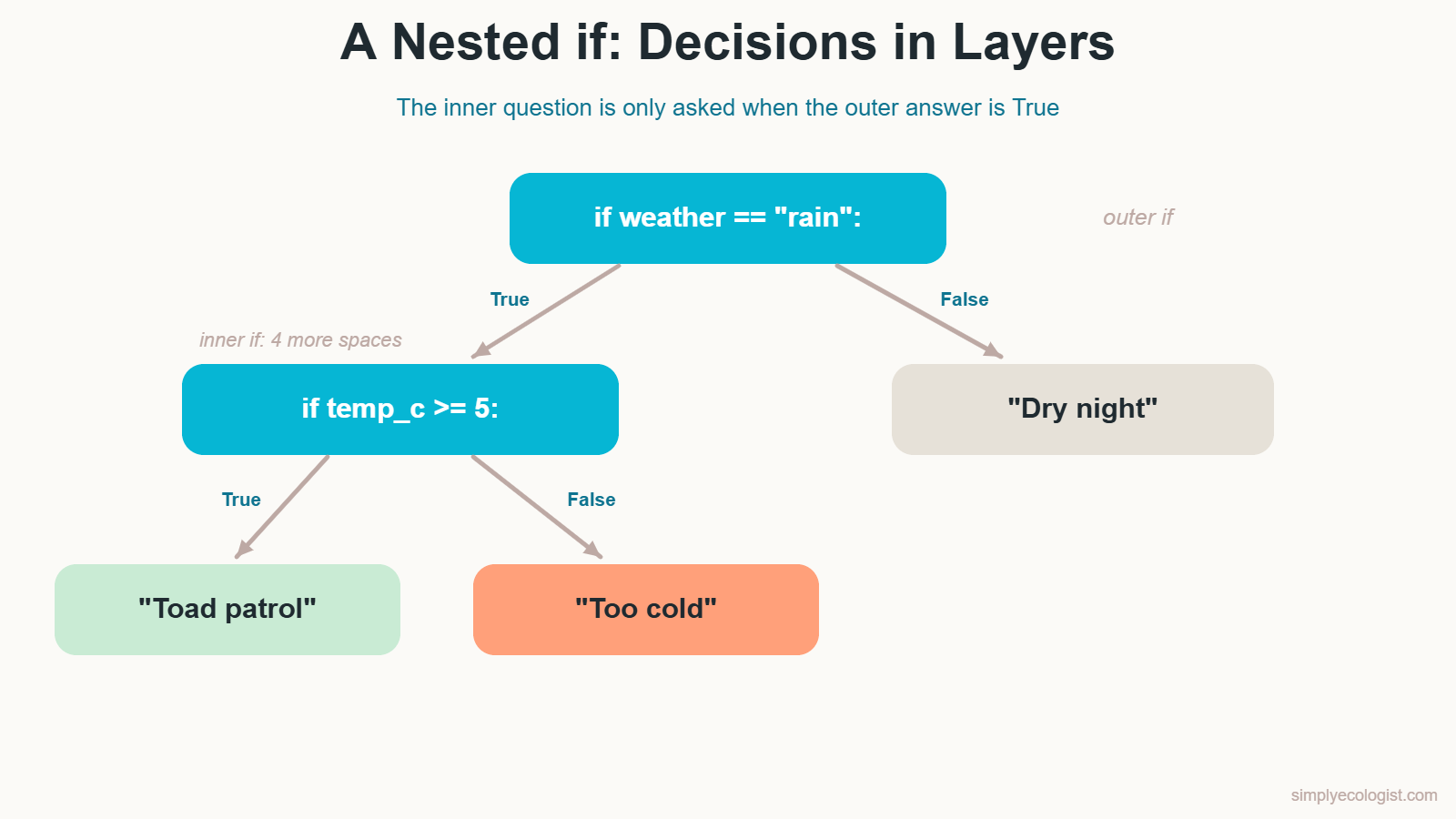
A nested if is an if inside another if. The inner question is only asked when the outer answer is true. It fits decisions that come in layers: first the weather, then, depending on the weather, the temperature.
weather = "rain"
temp_c = 8

if weather == "rain":
    print("Good night for amphibians.")
    if temp_c >= 5:
        print("Warm enough: start the toad crossing patrol.")
    else:
        print("Too cold: toads will stay put.")
else:
    print("Dry night: low amphibian activity.")
Good night for amphibians.
Warm enough: start the toad crossing patrol.Each level of nesting adds 4 more spaces. The inner if and else line up with each other, and the outer if and else line up with each other. That alignment is how Python knows which else belongs to which if.
Nested if or and: Which Should I Use?
The same decisions can often be written flat with and:
weather = "rain"
temp_c = 8

if weather == "rain" and temp_c >= 5:
    print("Start the toad crossing patrol.")
elif weather == "rain":
    print("Too cold: toads will stay put.")
else:
    print("Dry night: low amphibian activity.")
Both versions give the same answers. A flat chain with and is usually easier to read. Nesting is better when the outer step has its own action (like the first print in the nested version) or when the inner checks are long. If you find yourself three or four levels deep, it is time to flatten.
The official Python tutorial section on if statements is short and worth reading. For extra drills, W3Schools has small conditions exercises you can run in the browser.
Practice Tasks
All tasks read numbers with input(), so test each one several times, including the boundary values.
Task 1: Present?
Read the number of individuals you recorded at a site. If it is greater than 0, print Species present.
Show the solution
count = int(input("Individuals recorded: "))
if count > 0:
    print("Species present")
For 0, the program prints nothing.
Task 2: Present or Absent
Extend Task 1 so it prints Species absent when the count is not greater than 0.
Show the solution
count = int(input("Individuals recorded: "))
if count > 0:
    print("Species present")
else:
    print("Species absent")
Task 3: Inside the Range
Read a decimal pH value. Print YES if it is between 1 and 10 (both included), otherwise NO.
Show the solution
ph = float(input("Enter a pH value: "))
if 1 <= ph <= 10:
    print("YES")
else:
    print("NO")
The chained comparison from lesson 5 reads like maths. The longer version, ph >= 1 and ph <= 10, works too.
Task 4: Fix the Code
This program should warn you when fewer than 50 bait tubes are left. It warns at the wrong time. Find and fix the bug.
bait_tubes = 60
if bait_tubes > 50:
    print("Warning: bait is low. Order more.")
else:
    print("Bait stock is fine.")
Show the solution
The comparison points the wrong way. With 60 tubes it warns, and with 20 it says all is fine. Change the condition to bait_tubes < 50.
Task 5: Which Tray Sizes Fit?
You have grown a batch of seedlings and want to plant them out in trays without any half empty tray. Read the number of seedlings and print every tray size from 2 to 9 that divides it exactly.
Show the solution
seedlings = int(input("Number of seedlings: "))

if seedlings % 2 == 0:
    print("Fits trays of 2")
if seedlings % 3 == 0:
    print("Fits trays of 3")
if seedlings % 4 == 0:
    print("Fits trays of 4")
if seedlings % 5 == 0:
    print("Fits trays of 5")
if seedlings % 6 == 0:
    print("Fits trays of 6")
if seedlings % 7 == 0:
    print("Fits trays of 7")
if seedlings % 8 == 0:
    print("Fits trays of 8")
if seedlings % 9 == 0:
    print("Fits trays of 9")
Separate if statements, not elif, because several tray sizes can fit at once: 24 seedlings fit trays of 2, 3, 4, 6 and 8. In lesson 10 you will shrink these 16 lines to 3 with a for loop.
Task 6: Size Class of a Population
Read a population estimate and print its size class: Invalid count for zero or less, Fewer than 10 individuals, Tens of individuals, Hundreds of individuals, or Thousands or more.
Show the solution
population = int(input("Population estimate: "))

if population <= 0:
    print("Invalid count")
elif population < 10:
    print("Fewer than 10 individuals")
elif population < 100:
    print("Tens of individuals")
elif population < 1000:
    print("Hundreds of individuals")
else:
    print("Thousands or more")
Thanks to the order, each condition only needs an upper limit.
Task 7: Habitat Condition Class
A habitat assessment gives a score from 0 to 100, possibly with decimals. Read the score and print the condition class: below 51 is Poor, 51 to under 61 Moderate, 61 to under 71 Fair, 71 to under 81 Good, 81 to under 91 Very good, and 91 to 100 Excellent. Any other value is not valid.
Show the solution
score = float(input("Habitat score: "))

if 0 <= score < 51:
    print("Poor")
elif 51 <= score < 61:
    print("Moderate")
elif 61 <= score < 71:
    print("Fair")
elif 71 <= score < 81:
    print("Good")
elif 81 <= score < 91:
    print("Very good")
elif 91 <= score <= 100:
    print("Excellent")
else:
    print("The score is not valid.")
Here both limits are written out, so the first check also catches negative scores and the last else catches anything above 100.
Task 8: Lower of Two Transects
Read the butterfly counts from two transects and print the lower one. If they are equal, say so.
Show the solution
transect_a = int(input("Butterflies on transect A: "))
transect_b = int(input("Butterflies on transect B: "))

if transect_a < transect_b:
    print("The lower count is", transect_a)
elif transect_b < transect_a:
    print("The lower count is", transect_b)
else:
    print("Both transects have the same count.")
Task 9: Largest of Three
Read three nest counts and print the largest.
Show the solution
a = int(input("Nests at site A: "))
b = int(input("Nests at site B: "))
c = int(input("Nests at site C: "))

largest = a          # start by assuming a is the largest
if b > largest:
    largest = b
if c > largest:
    largest = c

print("The largest count is", largest)
A neat trick: assume the first value is the answer, then let each other value replace it if it is bigger. The same idea scales to hundreds of values once you learn loops.
Bonus Task: Survey Go or No Go
Ask whether it is raining (yes or no) and the wind speed in km/h. Use a nested if: when it is raining, cancel the survey. When it is dry, run the survey if the wind is below 20 km/h, otherwise postpone it. Then rewrite it without nesting.
Show the solution
raining = input("Is it raining? (yes/no) ")
wind_kmh = float(input("Wind speed in km/h: "))

if raining == "yes":
    print("Cancel the survey.")
else:
    if wind_kmh < 20:
        print("Run the survey.")
    else:
        print("Postpone: too windy.")
Without nesting:
raining = input("Is it raining? (yes/no) ")
wind_kmh = float(input("Wind speed in km/h: "))

if raining == "yes":
    print("Cancel the survey.")
elif wind_kmh < 20:
    print("Run the survey.")
else:
    print("Postpone: too windy.")
An else that contains only an if and else can always be turned into elif.
Quiz: Python if, elif and else
1. What must end the line of an if statement?
a) a semicolon b) a colon c) nothing
Show answer
b) a colon :
2. How does Python know which lines belong to an if block?
a) curly brackets b) indentation c) the word end
Show answer
b) indentation, normally 4 spaces.
3. Does else have a condition?
a) yes b) no
Show answer
b) no. It catches everything not handled above it.
4. x = 75. What prints?
if x > 50:
    print("A")
elif x > 70:
    print("B")
else:
    print("C")
a) A b) B c) A and B
Show answer
a) A. Only the first true block runs.
5. How many elif blocks can one if have?
a) one b) up to three c) as many as you need
Show answer
c) as many as you need.
6. Which error do you get when the line after an if is not indented?
a) ValueError b) IndentationError c) TypeError
Show answer
b) IndentationError
7. A number can be divisible by both 2 and 3. Which structure prints both messages?
a) if and elif b) two separate if statements c) if and else
Show answer
b) two separate if statements. An elif chain stops after the first true condition.
8. count = 100. Which branch runs: if count > 100, elif 50 <= count < 100, else?
a) the if b) the elif c) the else
Show answer
c) the else. 100 fits neither range, which is a classic boundary bug.
9. When is an inner (nested) if checked?
a) always b) only when the outer condition is true c) only when the outer condition is false
Show answer
b), if it sits inside the outer if block. (An inner if placed in the outer else block runs only when the outer condition is false.)
Key Takeaways
ifruns a block only when its condition isTrue.- End the condition line with a colon and indent the block by 4 spaces.
elsehas no condition and catches everything else.elifadds more conditions. Only the first true one runs, so order matters.- Use separate
ifstatements when several outcomes can be true together. - Nested
ifstatements handle layered decisions. Flatten them withandwhen it reads better. - Always test the exact boundary values of your ranges.
Previous lesson: Python input() Function
Next lesson: Python Ternary Operator.
Back to the course: Python for Biologists, all 16 lessons

Erzsebet Frey (Eli Frey) is an ecologist and online entrepreneur with a Master of Science in Ecology from the University of Belgrade. Originally from Serbia, she has lived in Sri Lanka since 2017. Eli has worked internationally in countries like Oman, Brazil, Germany, and Sri Lanka. In 2018, she expanded into SEO and blogging, completing courses from UC Davis and Edinburgh. Eli has founded multiple websites focused on biology, ecology, environmental science, sustainable and simple living, and outdoor activities. She enjoys creating nature and simple living videos on YouTube and participates in speleology, diving, and hiking. ORCID: 0009-0002-7482-7986
From the shop
Gifts for people who love the wild
Wildlife themed t-shirts, notebooks, tote bags, bandanas and guides, designed by an ecologist.
Visit the shop