
Lesson 1 of 16 in Python for Biologists, a free beginner course with ecology examples.
Is Python compiled or interpreted? It is a question that sounds technical, yet the answer quietly explains why Python feels so friendly to beginners. Before you write your first script, it helps to know what actually happens between the moment you press Run and the moment a number appears on your screen.
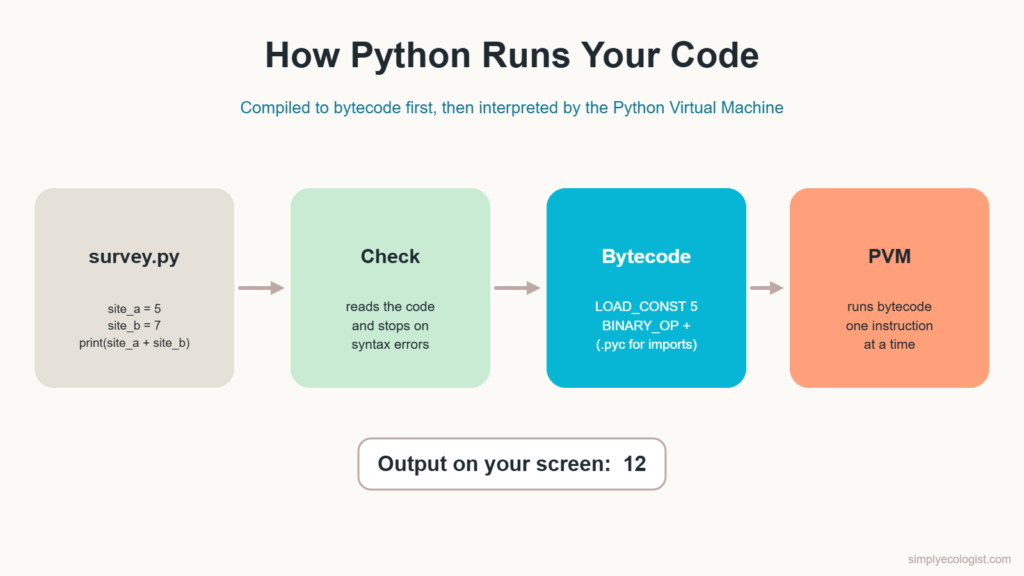
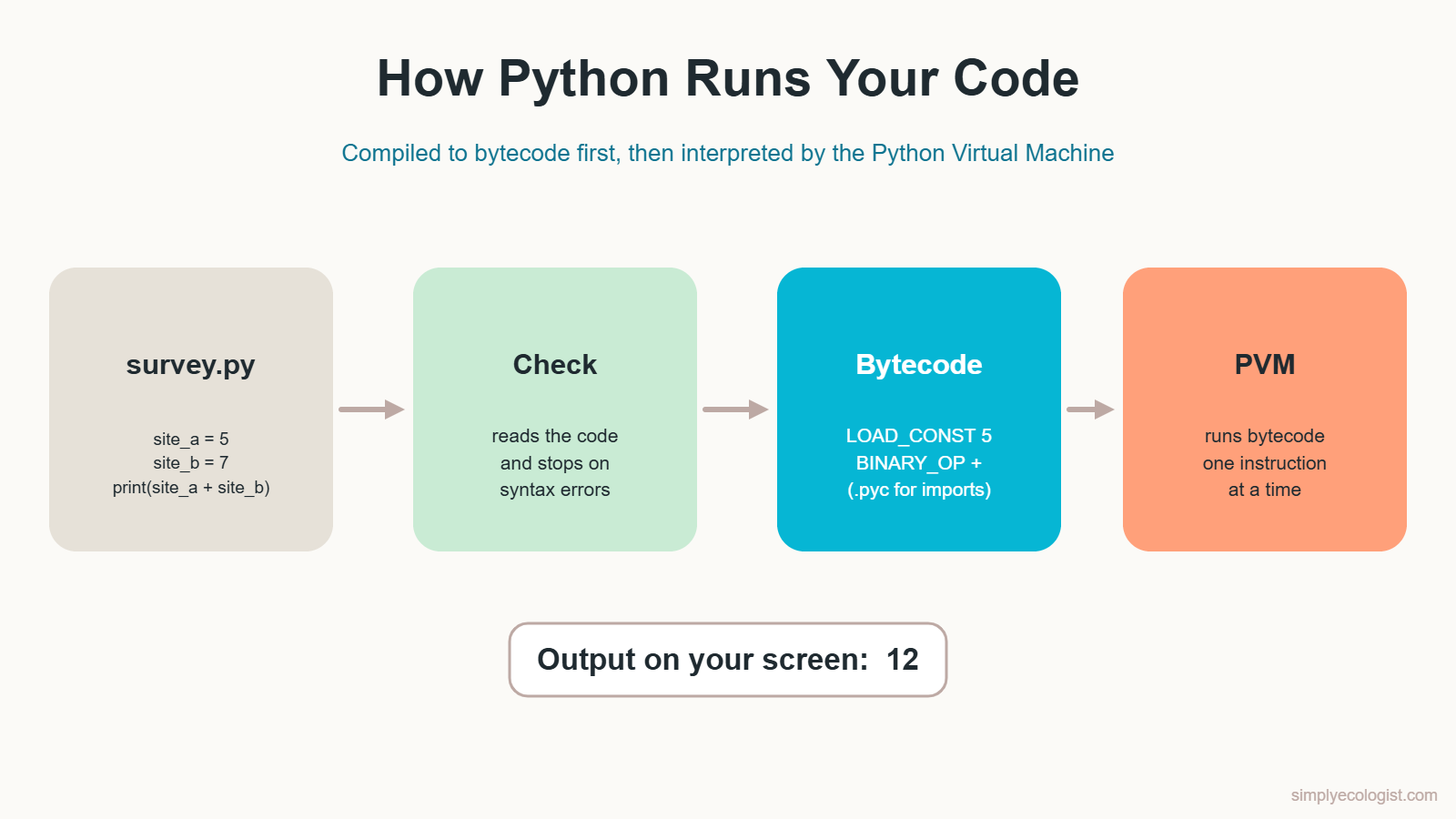
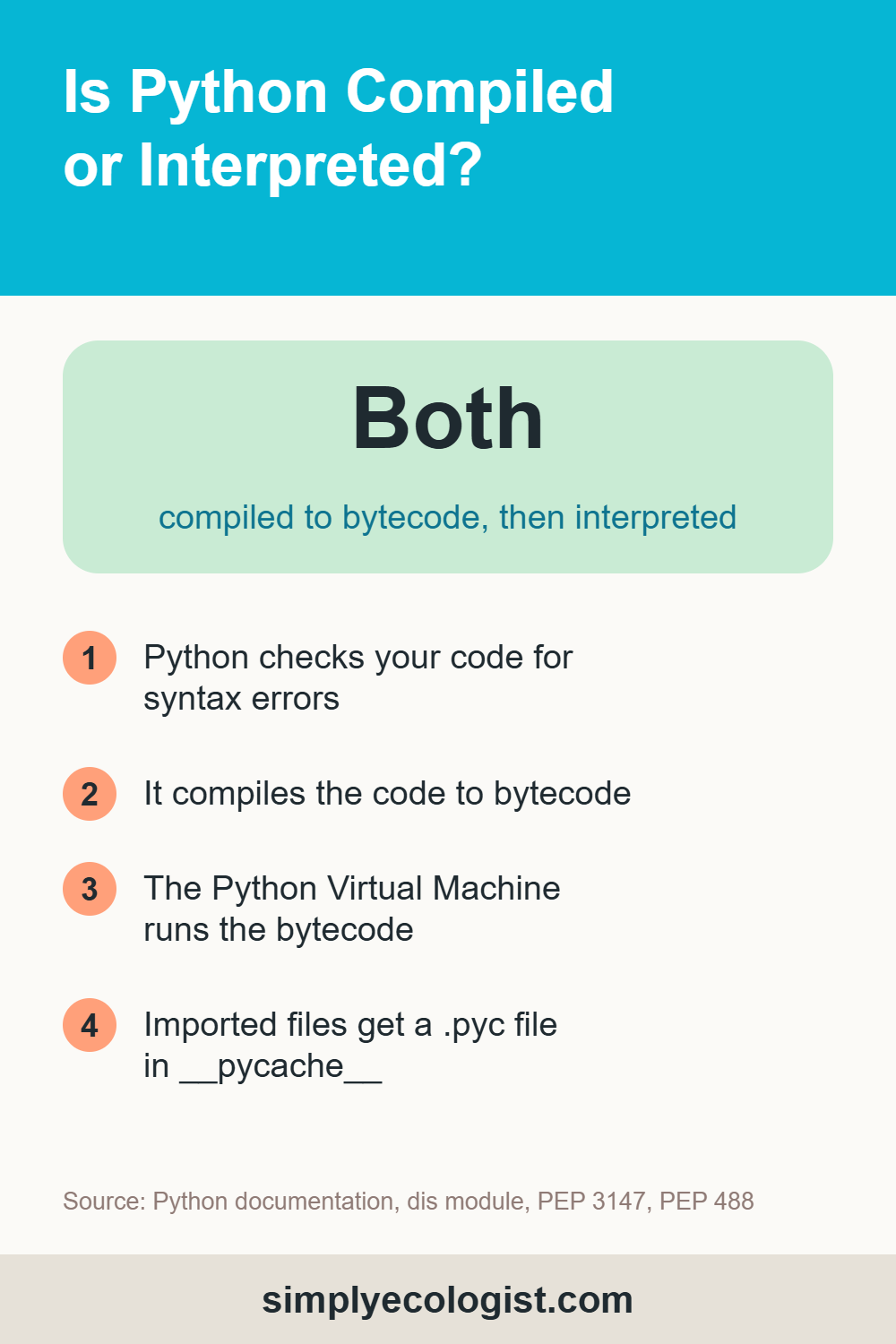
Quick answer: Python is both. When you run a script, Python first compiles your code into an intermediate form called bytecode. Then the Python Virtual Machine interprets that bytecode one instruction at a time. Because you never build a separate program file yourself, Python is usually called an interpreted language.
What You Will Learn in This Lesson
- What programming is and the five steps every program goes through
- Why computers need a programming language at all
- What makes Python a good first language for biologists
- The difference between a compiler and an interpreter
- How Python runs your code, step by step
- What each Python file extension means
What Is Programming?
Programming is solving a problem step by step, then writing those steps in a language a computer can follow. It starts long before you type any code. You first understand the problem, then plan a solution, then write the code, and finally test that it does what you expected.
Picture a week of bird surveys. You come back with seven field sheets, and you need the total number of birds per species. You could add them up by hand every week. Or you could write a short program once and let it do the adding forever after. That second option is programming.
The 5 Steps of Programming
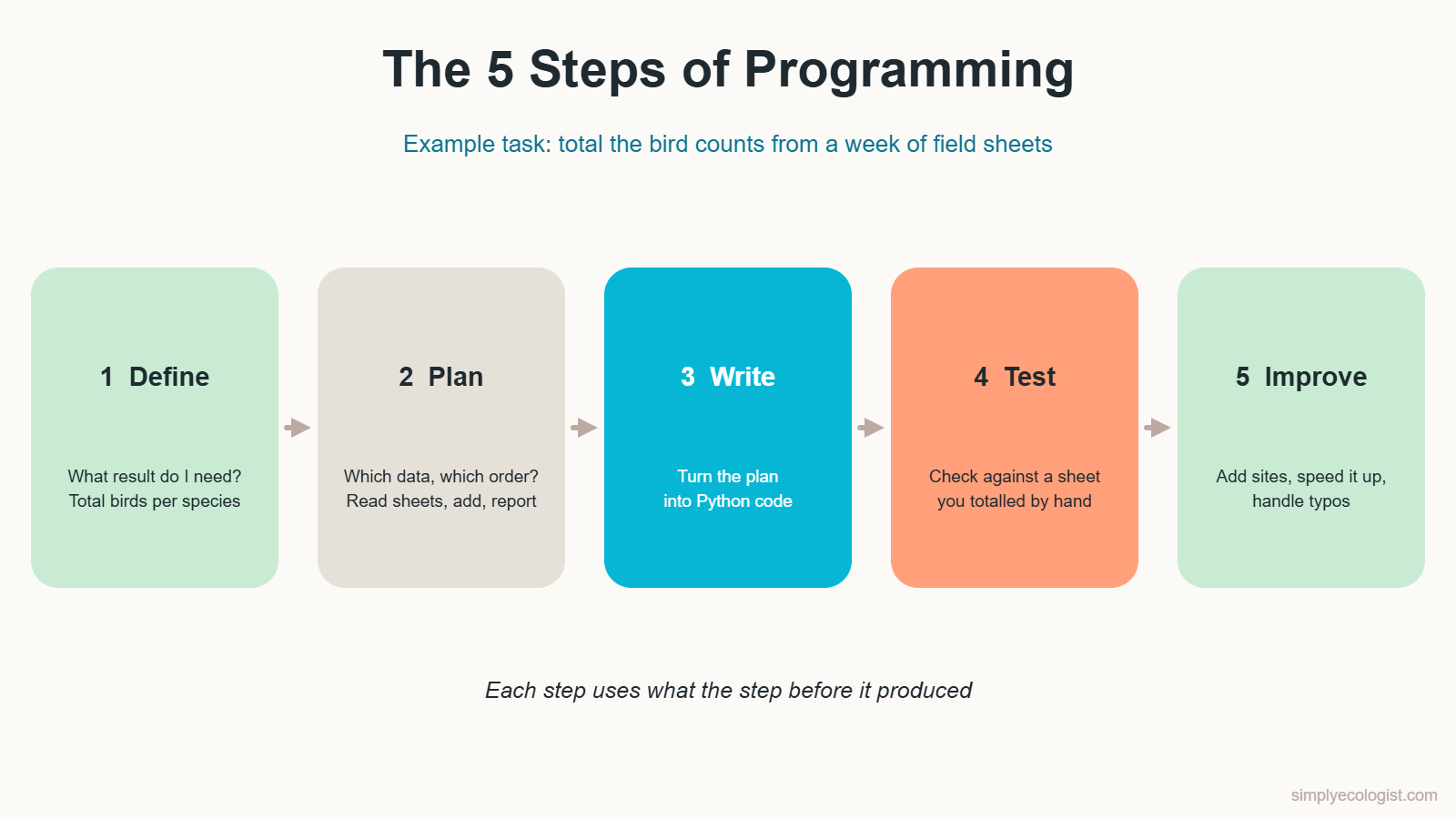
- Define the task. Decide exactly what you need. Here: the total number of birds per species for the week. A clear goal tells you when you are finished.
- Plan the solution. Decide which data you need and in what order to handle it. Read each sheet, add the counts per species, then print a short report. Planning is where you organise your thinking before you touch the keyboard.
- Write the code. Turn the plan into Python. In this course, the code arrives from lesson 2 onward.
- Test the solution. Run the program on one sheet you already totalled by hand. If the numbers match, you can trust it. If not, you have found a mistake early, which is the best time to find it.
- Improve the solution. Even a working program can get better. Add more survey sites, make it faster, or teach it to catch typos in species names.
Notice that each step uses what the step before it produced. A vague goal leads to a messy plan, and a messy plan leads to messy code.
Try It: Plan a Field Day in 5 Steps
Before writing any code, practise the thinking. Imagine you are organising a day of pitfall trapping at three sites. Write down what you would do at each of the five steps.
Show a sample answer
Define: collect and identify ground beetles from 15 traps across three sites in one day. Plan: pack labelled vials, set the route between sites, decide the order of trap checks. Write: fill in the field sheet for each trap as you go. Test: before leaving each site, check that every trap has a sheet and every vial has a label. Improve: after the day, note what slowed you down and change the route or kit for next time.
Why Do Computers Need a Programming Language?
Computers do not understand English, Serbian or any human language. At the lowest level, they work with binary code: long strings of 0s and 1s. Writing instructions directly in binary would be painfully slow and almost impossible to read.
A programming language is the bridge. It is a set of rules for writing instructions that people can read and computers can translate. Think of a field guide that only uses pictures. You could still describe a bird to someone using sketches, even if you are not an artist. Programming languages work the same way: they give you a shared language with the machine.
Here is how short a task becomes in Python. Two sites, two nest counts, one total:
site_a = 5
site_b = 7
print(site_a + site_b)
Python prints 12. Behind the scenes, those three readable lines are translated into instructions the processor can run. You never have to touch a single 0 or 1.
Try It: Decode a Binary Message
Each group of eight digits below stands for one character. What does the message say?
01010011 01100001 01110110 01100101 00100000 01110100 01101000 01100101 00100000 01100010 01100101 01100101 01110011 00100001Show the answer
It says Save the bees! You can check it yourself in Python later in the course with this line:
print("".join(chr(int(b, 2)) for b in "01010011 01100001 01110110 01100101".split()))That prints Save. Paste in the full string to decode the whole message.
What Makes Python a Good First Language?
Python is a general purpose programming language designed to be easy to read and easy to learn. It also happens to be extremely popular: Python still sat at the top of the TIOBE Index in October 2026, which ranks programming languages by how widely they are used and searched for. Five features explain why.
Simple Syntax
Python code reads almost like plain instructions. print(site_a + site_b) means exactly what it says. You spend your energy on the biology problem, not on decoding symbols.
Flexibility
Python lets you write code in several styles: simple step by step instructions, reusable functions, or code organised into objects. Think of it as a multi tool in your field vest. You open the blade you need for the task in front of you.
Dynamic Typing
You do not have to tell Python in advance whether a value is a number or text. Write count = 12 and Python knows it is a whole number. Write species = "Parus major" and it knows it is text. Fewer rules to remember means fewer early mistakes.
Interpreted Execution
You can run your code, see the result, change one line and run it again straight away. There is no separate build step. For a beginner, that fast feedback loop is gold.
A Rich Standard Library
Python comes with many ready made tools. Need today’s date for a survey record? You do not write that tool yourself. You borrow it:
from datetime import date
print(date.today())
What Is Python Used For in Biology?
The same features that make Python easy to learn also make it useful far beyond the classroom. Next to binoculars, GPS units and field sheets, it has become one of the tools ecologists use every week. Here is where it shows up in biology and ecology work.
- Data analysis. Libraries such as pandas and NumPy organise, filter and summarise large tables, such as a GBIF download with tens of thousands of occurrence records.
- Data visualisation. Matplotlib and Seaborn turn those tables into graphs for reports, theses and papers. Every diagram in this lesson was drawn with code.
- Machine learning. scikit-learn, TensorFlow and PyTorch power tools that sort photos from camera traps or identify birds from sound recordings.
- Web applications. Frameworks such as Django and Flask can run a species checklist website or an online data entry portal for volunteers.
- Desktop applications. Tkinter builds simple windows and forms, for example a small app for entering field sheet data on a laptop.
- Games and teaching tools. pygame can build a simple species identification game for students.
What Is the Difference Between a Compiler and an Interpreter?
We said earlier that a programming language needs to be translated into something the computer can run. There are two classic ways to do that translation.
A Compiler Translates Everything First
A compiler takes your whole program, translates it into machine code in one go, and saves the result as a separate executable file. You can run that file again and again without translating it each time. Programs built this way run fast. The catch: every time you change the source code, you must compile it again before you can run the new version.
Field comparison: imagine receiving a complete survey protocol, fully translated from another language, before you leave for the field. Every step is ready, so the work goes quickly. But if the protocol changes, you must wait for a new translation.
An Interpreter Translates as It Goes
An interpreter reads your code, translates it and runs it as it goes, without building a separate machine code file. This is slower, because the work happens every time the program runs. In return, you see results immediately and can fix a mistake the moment you spot it.
Field comparison: now imagine a colleague reading the protocol aloud to you, one step at a time, while you work. If you misread a step, you notice straight away and correct it before moving on.
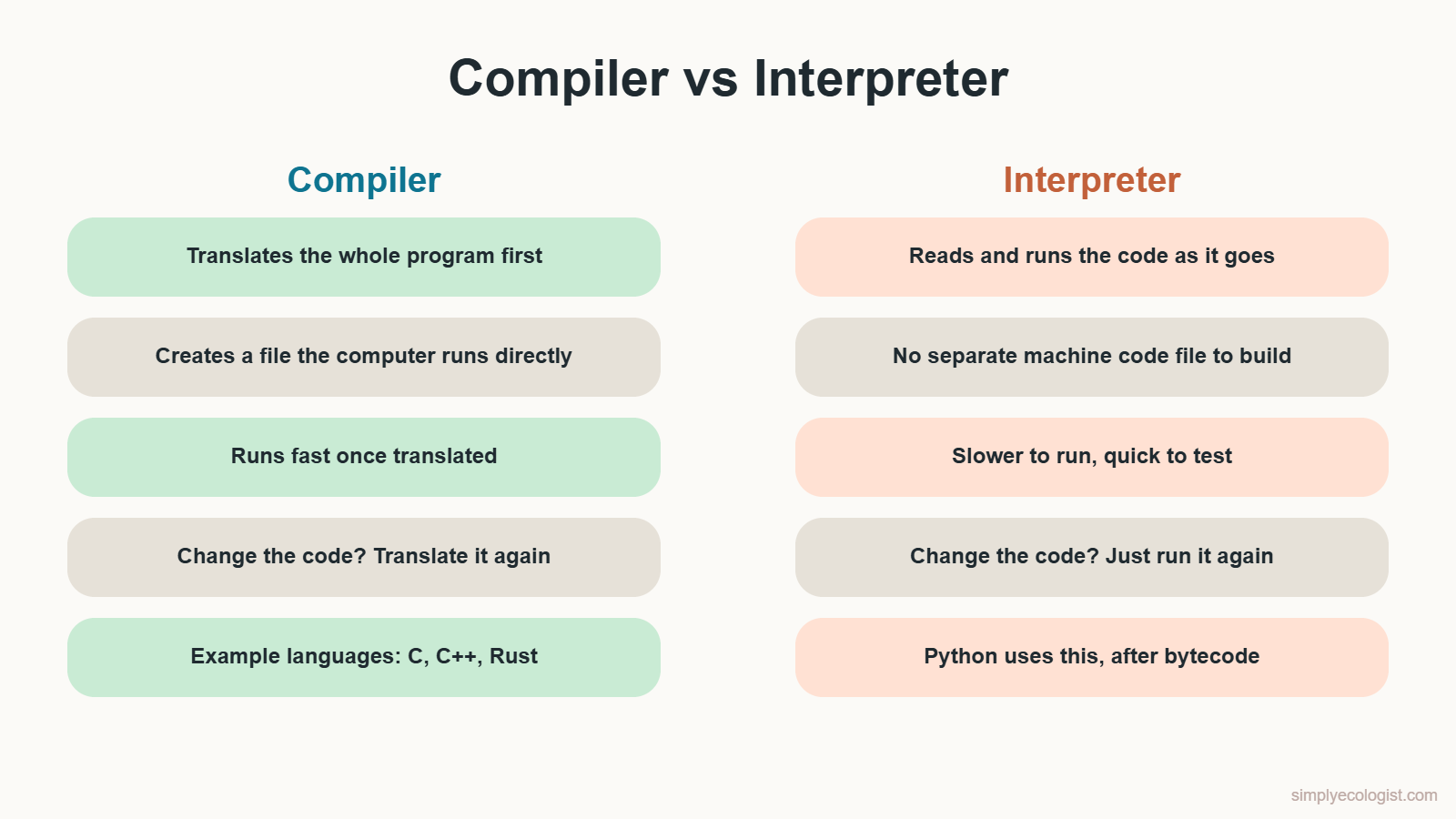
| Compiler | Interpreter | |
|---|---|---|
| When it translates | The whole program, before running | While the program runs |
| Output | A separate executable file | No separate machine code file |
| Speed | Fast to run | Slower to run |
| After a change | Compile again, then run | Just run again |
| Best for | Finished software that must be fast | Learning, testing and quick analysis |
Is Python Compiled or Interpreted?
Python is primarily designed as an interpreted language, but it quietly uses a compile step too. The standard version of Python, called CPython, runs your code in three stages.
Step 1: Python Checks Your Code
Python first reads your code and checks that it follows the rules of the language. If something is wrong, it stops before running anything and tells you where the problem is. Here is what happens if you forget to close a bracket:
count = (5 + 7
print(count)
File "broken.py", line 1
count = (5 + 7
^
SyntaxError: '(' was never closedPython even points at the bracket that caused the trouble. Get used to reading these messages. They are not scolding you. They are telling you exactly where to look.
Step 2: Python Compiles Your Code to Bytecode
Once the code passes the check, Python compiles it into bytecode. Bytecode is a simple set of instructions that sits between your Python code and the machine code your processor understands. Your processor cannot run it directly, but it is much closer to that level than the code you wrote.
You can see the bytecode for our nest count example with the built in dis module. This is the real output on Python 3.13:
  1           LOAD_CONST               0 (5)
              STORE_NAME               0 (site_a)

  2           LOAD_CONST               1 (7)
              STORE_NAME               1 (site_b)

  3           LOAD_NAME                2 (print)
              PUSH_NULL
              LOAD_NAME                0 (site_a)
              LOAD_NAME                1 (site_b)
              BINARY_OP                0 (+)
              CALL                     1
Read it like a field protocol: load the value 5, store it under the name site_a, load 7, store it as site_b, load both, add them, and call print. Another Python version may show slightly different instruction names, and that is normal.
Step 3: The Python Virtual Machine Runs the Bytecode
Finally, the Python Virtual Machine, or PVM, runs the bytecode one instruction at a time. The PVM is the heart of the interpreter. Because every computer with Python has its own PVM, the same bytecode can run on Windows, macOS and Linux.
Myth: Python is purely interpreted, line by line, straight from your text. Fact: Python compiles your code to bytecode first, then interprets the bytecode. It is a blend of both approaches, which is why it is quick to test and still reasonably fast to run.
When Does Python Save a .pyc File?
Many beginner guides say Python always saves your bytecode in a .pyc file. That is only half true, and testing it shows the real picture. I made a folder with two files. field_tools.py holds a small helper:
def total_nests(a, b):
    return a + b
And survey.py imports and uses it:
import field_tools
print(field_tools.total_nests(5, 7))
After running survey.py, the folder looked like this:
__pycache__/
    field_tools.cpython-313.pyc
field_tools.py
survey.py
Python saved bytecode only for field_tools.py, the file that was imported. The script I ran directly, survey.py, got no .pyc file at all. Python also tucks these files into a folder called __pycache__ and adds its version number to the name, so different Python versions never mix up each other’s bytecode. Next time you import field_tools, Python reuses the saved bytecode and skips recompiling, as long as the source file has not changed.
You never need to create, open or delete these files yourself. Python manages them.
What Are the Python File Extensions?
Like other languages, Python uses different file extensions for different jobs. Knowing them helps you understand what you are looking at when you open a project folder.
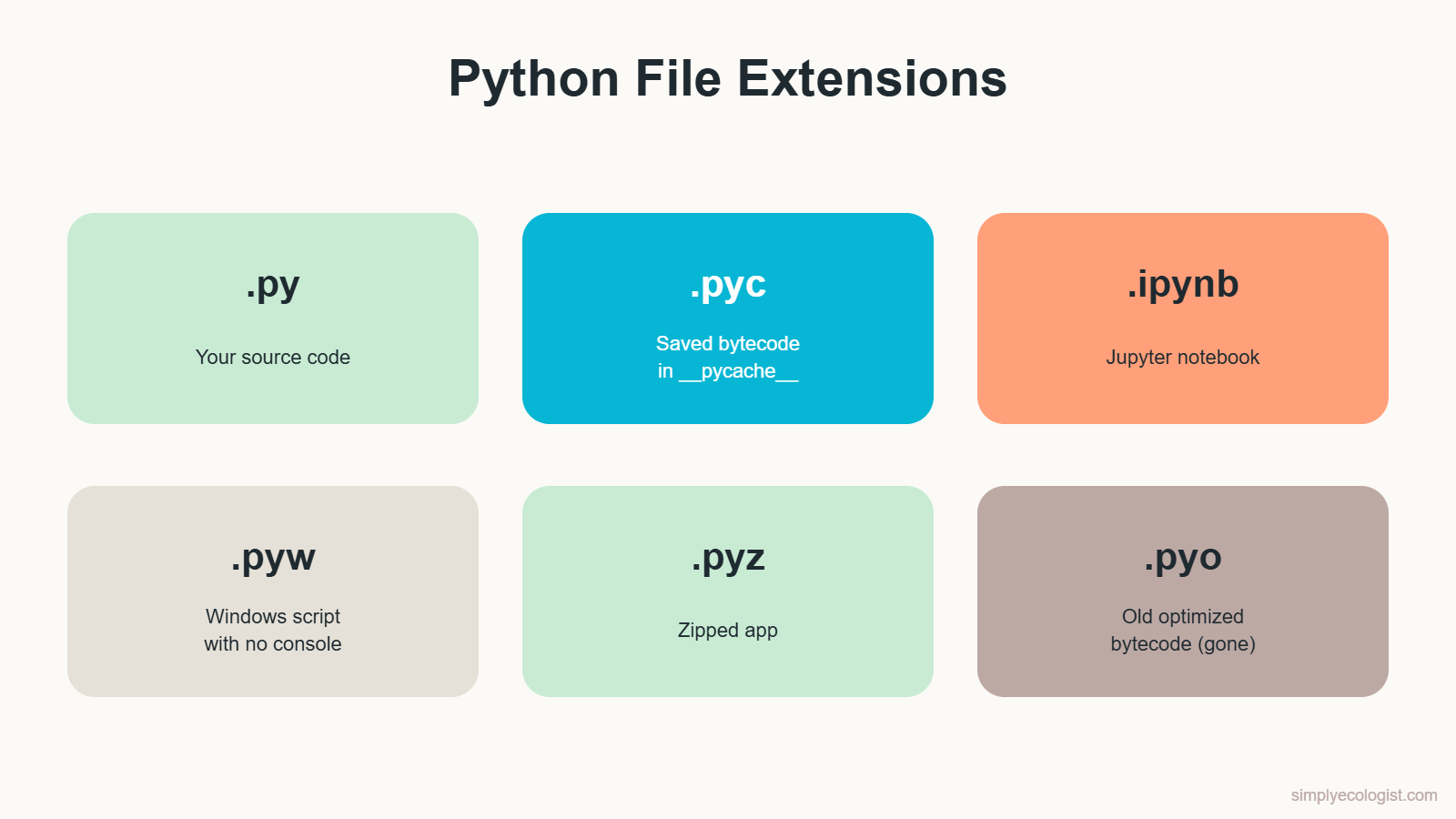
| Extension | What it holds | Example |
|---|---|---|
.py | Your Python source code. This is the file you write and run. | bird_counts.py |
.pyc | Compiled bytecode, saved in __pycache__ for imported files so they load faster next time. | field_tools.cpython-313.pyc |
.ipynb | A Jupyter notebook, which mixes code, results, graphs and notes in one document. Very common in research. | gbif_analysis.ipynb |
.pyw | A Python script for Windows that runs without opening a console window, useful for small desktop apps. | data_entry_form.pyw |
.pyz | A zipped Python application that bundles several files into one, so you can share a tool as a single file. | survey_tools.pyz |
.pyo | Old optimised bytecode. It was retired in Python 3.5 by PEP 488, and optimised bytecode now uses names ending in .opt-1.pyc or .opt-2.pyc instead. | Only in very old projects |
As a beginner, you will spend almost all your time with .py files, and later with .ipynb notebooks once you start analysing real data.
Quiz: How Much Do You Remember?
Answer each question in your head, then click to check.
1. Which step of programming comes right after defining the task?
a) Writing the code b) Planning the solution c) Testing
Show answer
b) Planning the solution. You decide which data you need and in what order before writing any code.
2. What language does a computer work with at the lowest level?
a) Python b) English c) Binary code of 0s and 1s
Show answer
c) Binary code. Programming languages exist so people do not have to write it by hand.
3. What does a compiler produce?
a) A separate executable file b) Nothing, it runs code as it reads it c) A Jupyter notebook
Show answer
a) A separate executable file that can be run many times without translating again.
4. So, is Python compiled or interpreted?
a) Only compiled b) Only interpreted c) Compiled to bytecode, then interpreted
Show answer
c) Both. Python compiles your code to bytecode, then the Python Virtual Machine interprets that bytecode.
5. What does the Python Virtual Machine do?
a) Checks spelling in comments b) Runs bytecode one instruction at a time c) Installs Python
Show answer
b) It runs the bytecode. It is the heart of the Python interpreter.
6. You run survey.py, which imports field_tools.py. Which file gets a .pyc file in __pycache__?
a) survey.py b) field_tools.py c) Both
Show answer
b) field_tools.py. Python caches bytecode for imported files, not for the script you run directly.
7. Which file extension is a Jupyter notebook?
a) .pyz b) .ipynb c) .pyw
Show answer
b) .ipynb, the notebook format many researchers use for data analysis.
8. Python stops and shows SyntaxError: '(' was never closed. When did this happen?
a) While checking the code, before running it b) Halfway through running it c) After printing the result
Show answer
a) While checking the code. Syntax errors are caught before any of your code runs.
Key Takeaways
- Programming follows five steps: define, plan, write, test and improve.
- Programming languages are the bridge between human ideas and the binary code computers run.
- A compiler translates a whole program in advance. An interpreter translates and runs code as it goes.
- Python is both: it compiles your code to bytecode, then the Python Virtual Machine interprets it.
- Python saves
.pycbytecode files in__pycache__for imported files only. - You will mostly work with
.pyscripts and.ipynbnotebooks.
Next lesson: How to Install Python on Windows and Write Your First Program in VS Code.
Back to the course: Python for Biologists, all 16 lessons

Erzsebet Frey (Eli Frey) is an ecologist and online entrepreneur with a Master of Science in Ecology from the University of Belgrade. Originally from Serbia, she has lived in Sri Lanka since 2017. Eli has worked internationally in countries like Oman, Brazil, Germany, and Sri Lanka. In 2018, she expanded into SEO and blogging, completing courses from UC Davis and Edinburgh. Eli has founded multiple websites focused on biology, ecology, environmental science, sustainable and simple living, and outdoor activities. She enjoys creating nature and simple living videos on YouTube and participates in speleology, diving, and hiking.
From the shop
Gifts for people who love the wild
Wildlife themed t-shirts, notebooks, tote bags, bandanas and guides, designed by an ecologist.
Visit the shop